


















Automated Budgeting: How to Set It Up and Keep Control

Automated budgeting: a budget allocated across categories. Image: 2Fin (ai2fin.com).
Automated budgeting means letting software do the repetitive work of a budget: importing transactions, sorting them into categories, moving money toward savings and flagging when a category runs hot. You still decide the rules and you still review the results. Done well, it turns a monthly chore into a ten-minute check-in. Done badly, it becomes a set of numbers nobody looks at.
This guide covers what is worth automating, what is not, which budgeting method suits automation, and how freelancers and small business owners should adapt it. The method works with any tool, and the 2Fin steps below show where Fin takes over the sorting.
Last reviewed October 2026. General information, not tax or financial advice. Dollar figures are examples, and tax references are to US rules unless stated.
TL;DR
- Automate the mechanical parts: transaction import, categorization, recurring transfers and reminders. Keep decisions, such as your targets and category rules, in your own hands.
- Pick a simple allocation rule first (for example 70-20-10), then let software track it. Automation amplifies a plan; it cannot replace one.
- If your income varies, budget on an average and a low-income range, and keep business and personal money separate from day one.
- Chatbots and assistants are good planning partners but should never hold your account numbers or passwords, and their output needs checking.
- Review weekly for five minutes and monthly for thirty. That is the whole maintenance cost.
What automated budgeting actually does
A manual budget has four recurring jobs: collecting transactions, labeling them, comparing them with your plan and acting on the gap. Automation handles the first three and nudges you on the fourth.
In practice that looks like this:
- Import. Transactions arrive from your bank feed or a file upload, with no retyping.
- Categorization. Software assigns each transaction to a category such as groceries, software subscriptions or fuel, and learns from your corrections.
- Comparison. Spending is checked against the limits you set, in real time rather than at month end.
- Movement of money. Scheduled transfers send a set amount to savings or bill accounts the moment income lands.
The value is mostly time. NerdWallet's guidance makes the same point: the main benefit of the technology is cutting the time spent sifting through and sorting data, a task people find tedious and software finds easy. The same article cautions that automated models can produce wrong answers, so summaries and suggestions should be verified.
If you are not sure where the month goes in the first place, where does my money go is the place to start, and why your budget stops working explains the usual reason a budget fades.
Choose the rule before you choose the tool
Most failed automated budgets fail for the same reason: the tool was set up before anyone decided what the money should do. A budgeting method is, in plain terms, a set of rules for deciding where your money goes before you spend it, rather than looking back at month end wondering where it went. That is exactly what automation needs: rules a machine can apply.
The 70-20-10 rule
The 70-20-10 rule splits take-home pay into 70% for living expenses, 20% for savings and investments, and 10% for debt repayment or giving. Chase notes it is often used as a simpler alternative to 50/30/20, and that critics point out it does not separate fixed from discretionary costs, which can make overspending inside the big 70% bucket easier.
On $4,000 of monthly take-home pay, the arithmetic is $2,800 for living costs, $800 for savings and investments and $400 for debt or giving. Two of those three numbers can be fully automated as transfers on payday. Only the 70% bucket needs ongoing attention.
Zero-based and envelope methods
Zero-based budgeting assigns every dollar a job. Envelope budgeting caps each category at a fixed amount. Both are stricter than 70-20-10 and both suit automation well, because limits are easy to monitor and alert on. The trade-off is setup time and more category tuning in the first two months.
Which should you start with?
| Situation | Method that tends to fit | What to automate |
|---|---|---|
| Steady salary, little budgeting history | 70-20-10 | Payday transfers, category alerts on the 70% bucket |
| Tight month-to-month cash flow | Zero-based | Bill reminders, category caps, weekly summary |
| Overspend on a few categories | Envelope-style caps | Alerts at 80% of each cap |
| Variable income | Average-based plan plus buffer | Percentage transfers on every deposit |
Start with the simplest option that matches your situation. You can tighten it later.
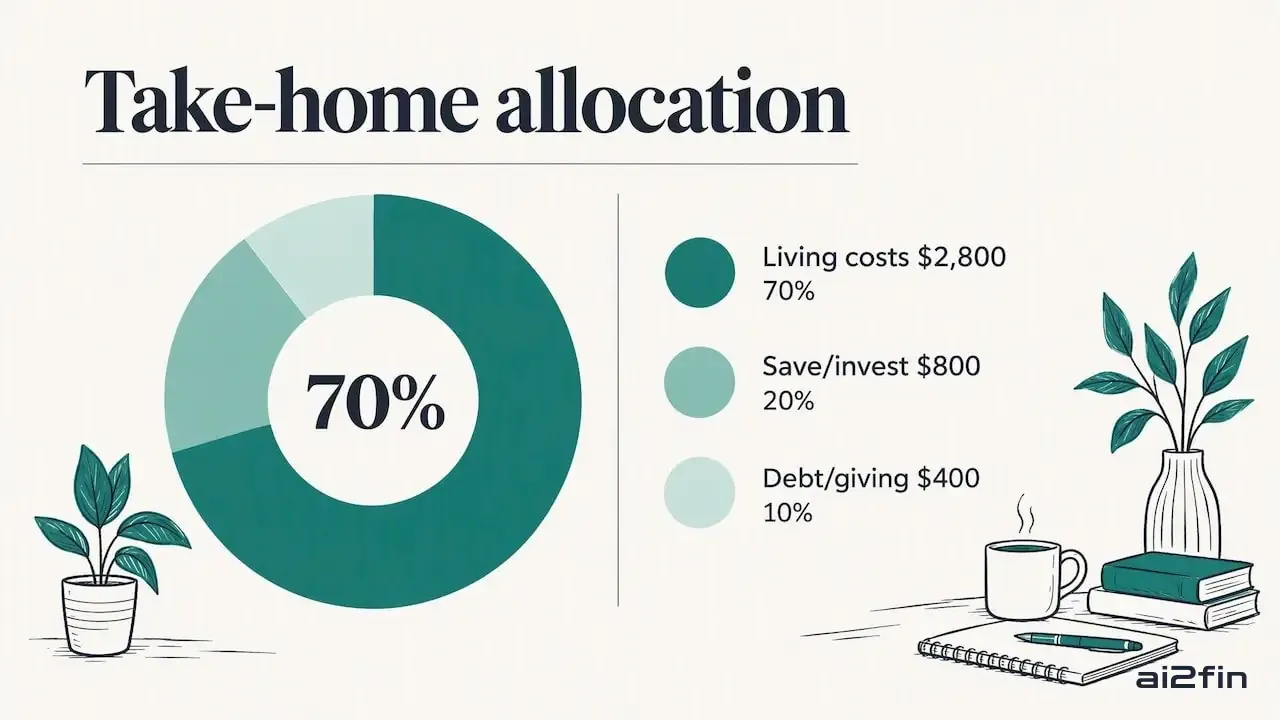
The 70-20-10 split of take-home pay. Image: 2Fin (ai2fin.com).
A weekend setup, step by step
This sequence takes a few hours and then largely runs itself.
- Gather three months of statements. You need real spending, not remembered spending. Most people undercount small recurring charges.
- Define your categories. Fewer is better. Ten to fifteen categories are easier to maintain than forty.
- Set your allocation. Choose a rule from above and write the dollar amounts down.
- Connect or import accounts. Bring in transactions through a bank feed or a file upload.
- Correct the first batch of categories by hand. Good software learns from this, so the first pass is an investment.
- Schedule transfers. Set savings and debt payments to move on payday, not at month end. What you never see in your checking account, you rarely miss.
- Set alerts. One per category that matters, triggered before the limit, not after.
- Book a recurring review. Five minutes weekly, thirty minutes monthly. Put it in your calendar.
The review is the part people skip, and it is the part that makes the system trustworthy. Automation without review drifts: a changed subscription price, a miscategorized transfer or a duplicate import quietly corrupts the numbers.
What to automate and what to keep manual
| Automate | Keep a human in the loop |
|---|---|
| Transaction import | Setting your targets and goals |
| Categorizing recurring merchants | Unusual or large one-off purchases |
| Savings and bill transfers | Debt payoff strategy changes |
| Spending alerts | Tax-related categorization (see below) |
| Monthly summary reports | Reading and acting on the summary |
The left column is rule-based and repetitive. The right column involves judgment, context or consequences if wrong. For the review side of the loop, budget vs actual analysis shows how to turn the monthly gap into a decision.
Fin tip: the transfers and the alerts are the easy half. The half that decays is the sorting, so let Fin do it and keep your attention for the short list of transactions it is unsure about. Try it on a real month.
Using chatbots and assistants in your budget safely
General-purpose assistants can help you think through a budget quickly. U.S. Bank's guidance is clear about the limits: treat an assistant as a planning partner rather than a financial manager, do not share account numbers, passwords or Social Security numbers, and instead give it anonymized summaries of income, fixed expenses and variable spending.
A safe prompt looks like this: "Monthly take-home is about $4,000. Fixed costs total roughly $1,900. Variable spending averages $900 across groceries, transport and dining. Suggest three ways to reach a 20% savings rate." No names, no account details, just categories and totals.
Two cautions apply. First, verify any arithmetic or claim the assistant produces, since models can be confidently wrong. Second, do not lean on chatbots for complex financial problems. The Consumer Financial Protection Bureau's review of chatbots in consumer finance warns that relying on them for nuanced situations can lead to inaccurate information, frustration and extra fees. For tax questions specific to your situation, a licensed accountant or enrolled agent is the right person to ask.
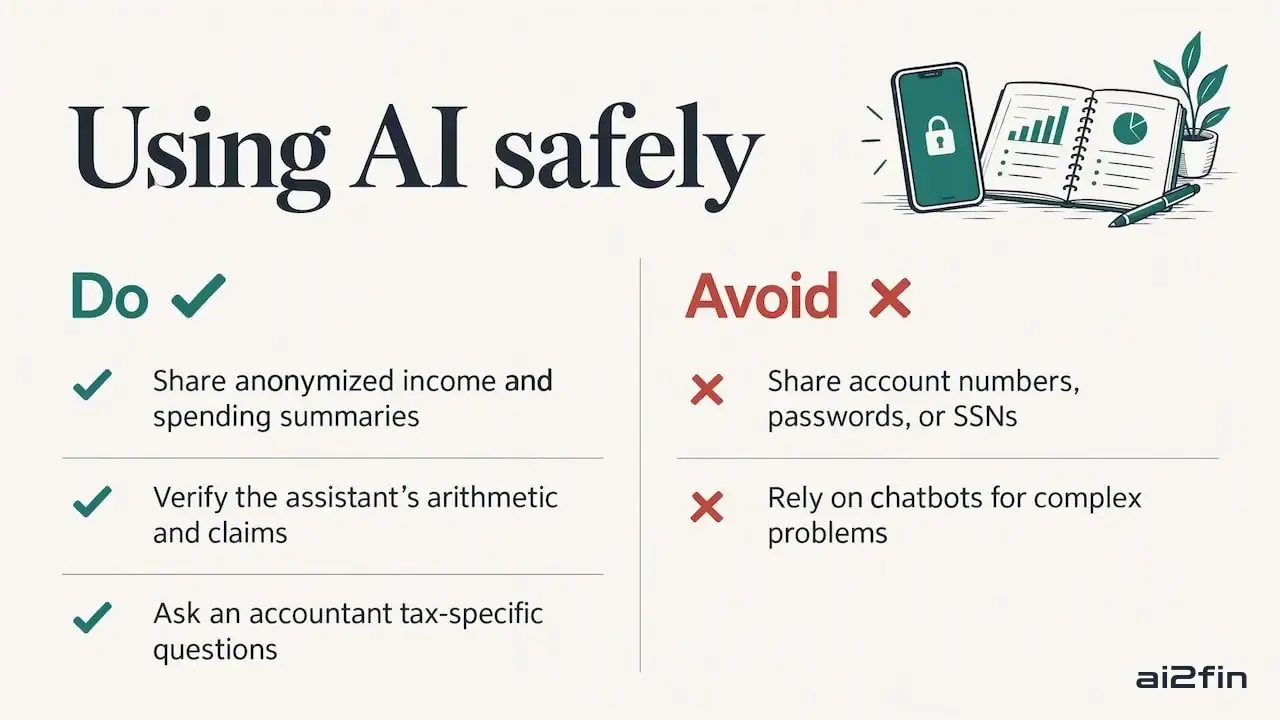
Using chatbots in your budget safely. Image: 2Fin (ai2fin.com).
If your income varies: freelancers and sole traders
A fixed monthly budget assumes a fixed monthly paycheck. Freelancers, sole traders and gig workers do not have one. Two adjustments make automation work for variable income.
Budget on a range, not a single number. Look at your last six to twelve months, find the average and the lowest month, and build your essential costs around the low figure. Anything above that goes to savings, tax set-asides or goals. Public financial-education material makes the same point: people with variable income should budget on their income range and average and separate business from personal costs from the start. Budgeting on an irregular income walks through it with numbers.
Use percentages, not fixed transfers. Instead of moving $500 to savings monthly, move a share of every deposit. A good month then builds your buffer automatically, and a thin month does not overdraw your account.
A practical split for each client payment might be: a share to a tax set-aside account, a share to a buffer, and the remainder to your operating account that pays you a steady "salary" each month. The percentages depend on your tax situation, so ask your accountant for the right tax figure rather than guessing. The US income tax calculator gives a federal take-home estimate that can help you sanity-check the numbers, and how to estimate quarterly taxes covers the payment side.
Work out your US take-home pay
The cash flow forecast shows the next 90 days, which is useful for deciding how large the buffer should be. Sole traders can start with separating business and personal expenses, and freelancers with the freelance expense tracking system.
Records matter more when budgeting touches taxes
For employees, a budget is a personal tool. For anyone running a business, the same transactions double as tax records, and that raises the bar.
The IRS says small business owners should choose a recordkeeping system that clearly shows income and expenses, and that supporting documents such as receipts, invoices and canceled checks back up entries in your books. The general retention period it gives is three years, though it depends on the action, expense or event, and employment tax records can require longer. Check the IRS page for your situation.
IRS Publication 583 adds a point that matters for automation. If you use software, your electronic system must produce legible records that tie entries to source documents such as invoices and receipts. In other words, an auto-categorized line with no receipt behind it is weaker evidence than one with the receipt attached. The same publication notes that recordkeeping software packages are helpful and fairly easy to use, and require little bookkeeping knowledge.
What this means in practice:
- Photograph or upload receipts when you buy, not at tax time. Organise receipts for tax shows a routine that holds up.
- Keep business and personal accounts separate. If you cannot, tag every transaction by purpose, and use split transactions for mixed purchases.
- Make sure any tool you use can export a clean record that your accountant can read. What your accountant needs at tax time lists it.
- If you hold equipment, vehicles or other assets you depreciate, keep an organized list. A fixed asset register records what you bought, when, what it cost and how it is written down.
Legal responsibility also stays with you. Automated tools are assistants, and liability for tax and financial errors typically remains with the account holder, not the software provider. Treat auto-categorization of deductions as a draft for your accountant to confirm.
Automate the sorting, not the thinking
People do not abandon budgets because the math is hard. They abandon them because the upkeep is dull. Sorting hundreds of transactions by hand every month is the part nobody sustains.
So the line belongs in a specific place. Software should do the sorting, learn from your corrections and surface what changed. You should own the decisions: the targets, the trade-offs, and what counts as a business expense.
Three principles are worth looking for in any tool:
- Learning beats rigid rules. Categorization that adapts to your behavior needs fewer manual fixes over time than a fixed rulebook. The documentation explains how smart categorization and the analysis tools work.
- One place for personal, business and rental costs. Split use is where budgets and tax records most often go wrong. Tracking those splits in one platform, with depreciation and cost of goods sold alongside, avoids reconciling several spreadsheets.
- Your data stays portable. A budget you cannot export is a budget you are stuck with. Accountant-ready exports and links to tools such as Google Sheets, Excel, Notion and Xero mean your numbers go where you work.
Automation is a means of freeing attention for the few financial choices that matter. Everything else should run quietly in the background.
Common mistakes to avoid
- Setting it and forgetting it. Automatic does not mean unattended. Schedule the review.
- Too many categories. Detail you never read is noise.
- Trusting every auto-label. Check large transactions and anything that could affect a deduction.
- Budgeting on gross income. Use take-home pay, the money that actually reaches your account.
- Mixing business and personal spending. It makes both your budget and your tax records unreliable.
- Sharing sensitive details with a chatbot. Anonymized totals are enough for planning help.
Automated budgeting with 2Fin
- Bank imports and statement uploads that keep actuals current
- Categorization that learns from your corrections
- Budget allocations and interactive money views
- Accountant-ready exports
The free plan is the easy way to try it first, and the pricing page lists what each tier includes. To see the path from bank import to organized books, how 2Fin works walks through it, and the features overview covers receipts, sorting and tax tools. Small business owners can also read about bookkeeping software for small business. Related guides: automated bookkeeping for small businesses, bank reconciliation automation and how expense tracking works.
Frequently asked questions
How do I automate my budget without losing control?
Automate import, categorization and scheduled transfers, and keep a short weekly review for exceptions. Set alerts before limits are hit rather than after. If a category keeps misfiring, correct it once so the system learns.
Is automated budgeting safe?
It can be, if you choose tools carefully and limit what you share. With general-purpose chatbots, give only anonymized totals and never account numbers, passwords or Social Security numbers. With any app, read how it handles your data and check its export options.
Can I use a chatbot to create a budget?
Yes, as a planning partner. Give it summarized income and spending by category and ask for structure or options, then verify the numbers yourself. For tax-specific or complex decisions, consult a licensed professional.
What is the 70-20-10 budget rule?
It divides take-home pay into 70% for living expenses, 20% for savings and investments, and 10% for debt repayment or giving. It is simple to automate but does not separate needs from wants, so watch the large 70% category closely.
Do freelancers need a different approach?
Yes. Base your essentials on your lowest typical month, use percentage-based transfers on each payment, and keep business and personal finances separate. Records matter extra for self-employed people, since your transactions also support your tax return.
How does 2Fin help automate a budget?
Connect a bank or drop in statements, and Fin sorts each transaction, learns from your corrections and keeps the unsure ones in one review list. Allocations and alerts show where a category runs hot, and exports hand the records to your accountant.
