
Bank reconciliation automation matches transactions from bank feeds against your ledger using rules and algorithms instead of manual line-by-line checks, flagging only the exceptions a human needs to review. The payoff is a faster close, fewer manual hours spent on repetitive matching, and higher accuracy for in-house finance teams, accountants and bookkeepers, and small business owners managing recurring transactions across multiple accounts.
TL;DR:
- Track match rate, days to close, and exceptions per period; review the queue weekly, since sudden increases can reveal feed changes or stale rules.
- Pilot one or two representative accounts against a manually reconciled period, then run both processes through a full close before expanding.
- Separate rule editors from posting approvers, and log each match, rule change, approval, and resolution to preserve accountability and audit history.
- A pilot typically takes a few weeks, while broader rollout and stabilization can add one to two months; budget internal time for rule tuning.
- Rules that expect cash on the same day can create false exceptions when electronic transfers take multiple days to settle.
Key features of reconciliation software and the benefits they produce
Not every reconciliation tool does the same job well, and the features that matter most are the ones that directly reduce manual touch points. Before choosing a platform, look at what each capability actually changes in your daily workflow.
- Multi-bank integration: pulls feeds from several banks and accounts into one view, cutting the time spent logging into separate portals.
- Rule-based matching: applies exact and fuzzy matching logic to pair bank lines with ledger entries automatically.
- Auto GL posting: pushes matched transactions straight to the general ledger without a manual journal entry.
- Exception queue: isolates unmatched or ambiguous items so staff only review what actually needs judgment.
- Dashboards: show match rates, aging exceptions, and close progress at a glance.
- Third-party integrations: connect reconciliation data to accounting platforms, spreadsheets, and reporting tools teams already use.
Each feature maps to a measurable outcome. Multi-bank integration reduces the hours spent gathering statements. Rule-based matching and auto GL posting shrink the volume of manual journal entries, which lowers the chance of a transposition error or a missed line. Exception queues keep attention on the transactions that carry real risk, like duplicate payments or misapplied cash, instead of spreading reviewer attention evenly across every line.
One useful way to track this: automated reconciliation flags only the exceptions for human review, which is the core shift automation makes to the workload. Teams typically track three KPIs to confirm the benefit is real: match rate (the share of transactions cleared without intervention), days to close (how long the reconciliation cycle takes from period end to sign-off), and exceptions per period (a rising count usually signals a feed problem or a rule that has gone stale).
How bank reconciliation automation actually works
Automated matching runs through a layered process, not a single pass. Understanding the layers helps finance teams see where controls belong and where a human should still have the final say.
- Data ingestion: transactions arrive through bank APIs (open banking where it is available), CSV uploads, MT940 files, or payment rail feeds, depending on what each bank or payment processor supports.
- Exact matching: the system pairs bank lines to ledger entries that agree on amount, date, and reference number.
- Fuzzy and rule-based matching: when an exact match fails, the engine applies tolerance rules, such as date windows or partial reference matches, to catch near-matches. This is where messy bank transaction descriptors (processor prefixes, store numbers, truncated names) cause the most misses.
- ML-assisted suggestions: some platforms rank likely matches using pattern recognition from prior reconciliations, presenting a best guess rather than forcing a manual search.
- Manual exception review: anything that fails all automated tiers lands in a queue for a person to investigate and resolve.
Rule governance sits underneath every tier. Rules need a priority order (which rule fires first when more than one could apply), fallback logic (what happens when no rule matches), and thresholds (how close a fuzzy match has to be before it is accepted automatically). Tuning these settings is ongoing work, not a one-time setup task.
The exception workflow is where audit readiness lives. Each exception needs clear ownership, a note explaining the resolution, and a log entry capturing who acted and when. Guidance for auditors on computer-based environments stresses that automation changes the control environment rather than removing the need for one, so documentation at this stage matters as much as the matching logic itself.

Pro Tip: Review your exception queue weekly even after automation is stable: a sudden jump in exceptions is often the first sign a bank feed format changed or a rule needs retuning.
Steps to implement reconciliation automation in your finance team
Moving from manual reconciliation to an automated process works best as a staged rollout rather than a single switch.
- Assess current volume and pain points: count transactions per period, identify which accounts generate the most manual effort, and map each account to its ledger counterpart.
- Choose your data approach: decide between direct bank APIs, file imports (CSV or MT940), or a middleware layer where direct integration is not available.
- Build matching rules on a sample: start with one or two accounts, write rules for your most common transaction types, and test against a period you have already reconciled manually.
- Pilot and compare results: run the automated process alongside the manual one for a cycle and check the match rate against your own historical data rather than a vendor's published benchmark.
- Set governance before scaling: define who approves rule changes, who can authorize automatic GL postings, and what the rollback procedure looks like if a rule misfires.
- Train the team and define KPIs: agree on match rate, days to close, and exceptions-per-period targets before go-live, then roll out account by account.
A few practical points make the difference between a smooth rollout and a stalled one:
- Pilot with a representative sample, not your simplest account: a clean payroll account will not reveal the edge cases your messier vendor accounts will.
- Keep a manual fallback path during the first full close cycle in case feed issues or rule gaps appear.
- Document every rule change with a date, the reason for the change, and who approved it.
- Expect to revisit thresholds after the first two or three cycles as real transaction patterns surface.
Segregation of duties deserves its own line here: the person who builds or edits a matching rule should not be the same person who approves the resulting automatic journal postings. It is one of the most important controls in an automated process, since automated postings can scale an error just as easily as they scale accuracy.
Staged rollout also gives you a stabilization window. Rather than automating every account in one weekend, bring on your highest-volume, most standardized accounts first, then extend the rule set to accounts with more variable transaction types once the first group is running cleanly for a few cycles.
Controls and audit trail requirements for automated reconciliation
Automation does not remove the need for internal controls, it relocates them. Auditors and finance leaders now need to see how a match happened, not just that it happened.
- Transaction-level audit logs: every automated match needs a record of which rule fired, what data it compared, and the timestamp.
- Explainable matching rules: a rule that cannot be described in plain language to an auditor is a rule that will slow down an audit, not speed one up. (This is why Fin shows how it decided on every row.)
- Documented rule changes: version history for every rule edit, including who approved it and why it changed.
- Segregation of duties: separate the people who configure rules from the people who approve automatic postings.
- Timing-sensitive settlement handling: cash-in-transit and other settlement delays need to be reflected in the reconciliation window, not treated as unexplained gaps.
On that last point, IFRS staff analysis on cash received via electronic transfer found that settlement timing on electronic transfer systems can span multiple days, which affects when cash should be recognized and, by extension, how reconciliation windows should be set. A rule that expects same-day settlement on a payment rail that actually clears in two or three days will generate false exceptions every single cycle.
Keeping this documentation current is less about satisfying an audit checklist and more about making sure the automation itself stays trustworthy over time.
Common pitfalls in reconciliation automation and how to manage them
Automation introduces its own failure modes, and most of them are preventable with routine checks rather than a bigger system.
- Timing differences: cash-in-transit and settlement lag can look like a mismatch when it is really a timing issue, so flag these separately from true exceptions rather than forcing a match.
- Overfitting rules: a rule written too narrowly to force a match on one problem transaction can quietly hide genuine errors in future periods.
- Poor-quality feeds: missing statements, delayed feeds, or inconsistent file formats from a bank are an infrastructure problem, not a matching problem, and need to be fixed at the source.
- Complex exceptions: duplicate payments, split transactions, and misclassified entries still need a human to triage; automation should route these to the right reviewer, not attempt to force a match.
Keeping a routine review of rule performance, comparing auto-matched results against a manually checked sample every few cycles, catches overfitting before it becomes a pattern.
How AI2Fin fits reconciliation into a full bookkeeping flow
Reconciliation does not happen in isolation. 2Fin’s flow runs from bank import through categorization, auto-matching, exception review, and accountant-ready export, so reconciliation sits inside the same process that produces tax-ready books rather than as a separate task bolted onto the end of the month.
- Bank import and categorization: transactions pull in automatically and get sorted by type, and recurring patterns are recognised so repeat payments match without new rules.
- Rules and matching: your rules categorise recurring transactions, Fin matches receipts and invoice payments as they land, and anything it cannot place stays visible for you to review instead of getting buried in a spreadsheet.
- Integrations: connections to Xero and Google Sheets mean reconciled data lands where your existing reporting already lives.
- Accountant-ready exports: a documented trail of categorized, matched transactions makes year-end review faster for whoever signs off on your books.
Pro Tip: Export your reconciled transaction log every period, even if your accountant only reviews it quarterly: a running export is far easier to audit than reconstructing a quarter from scratch. Automating the bookkeeping handover takes the remembering out of it.
2Fin’s feature set is built around this same principle of reducing manual touch points without removing the review step where it genuinely matters.
Typical timeline and cost considerations for rollout
Rolling out reconciliation automation usually runs in phases rather than a single go-live date. A pilot on one or two accounts, including rule building and testing against a manually reconciled period, generally takes a few weeks before you have enough data to trust the match rate. Extending rules to additional accounts and running a full stabilization cycle typically adds another one to two months, depending on how many transaction types and banks are involved.
Cost considerations split into two categories: subscription or licensing fees for the software itself, and the internal time cost of building and tuning rules during the pilot. Teams with simple, high-volume, standardized transactions (think payroll or a single merchant account) tend to see automation pay off faster than teams with highly variable transaction types that need many narrow rules.
Budgeting for the first few cycles should include time for rule adjustments. Expect to revisit thresholds and fallback logic after the first full close, since real transaction patterns rarely match the assumptions made during the initial build. Treat the pilot period as a cost of learning your own data, not a sign the automation is failing.
Security and data privacy in automated reconciliation
Connecting bank feeds to a reconciliation platform means handling financial data that needs the same care as any other sensitive business information. A few practical considerations matter most.
Encryption in transit and at rest should be standard for any platform handling bank feed data, and access to raw transaction data should be limited to the roles that genuinely need it. Role-based access controls matter particularly for the segregation of duties point raised earlier: the person configuring matching rules does not need the same access level as the person approving journal postings.
Data retention policies deserve attention too. Transaction-level audit logs need to persist long enough to satisfy audit requirements, but retention policies should also be clear about what happens to that data if you change platforms or close an account.
For integrations with external tools like spreadsheets or accounting platforms, check how data moves between systems and whether it passes through a third-party middleware layer or a direct, authenticated connection. A direct bank API connection generally offers tighter control over data exposure than file-based imports that pass through multiple intermediate systems.
Keeping reconciliation rules accurate over time
Matching rules degrade quietly. A rule written for one bank's file format can start producing false exceptions the moment that bank changes its statement layout, and nobody notices until the exception queue grows.
Routine rule review catches this early. Comparing auto-matched results against a manually checked sample every few cycles, the same practice used to catch overfitting, also catches rules that have simply gone stale. Set a recurring calendar reminder rather than relying on someone noticing a problem organically.
Version control for rule changes matters as much for ongoing accuracy as it does for audit purposes. Knowing exactly when a rule changed and why makes it far easier to diagnose a sudden shift in match rate. Teams that skip this step often end up re-diagnosing the same problem months later because nobody remembers what changed.
Finally, treat your KPI dashboard as an early warning system, not just a reporting tool. A gradual decline in match rate over several cycles is a far more useful signal than waiting for an exception queue to overflow before investigating.
Training your team and managing the shift to automation
The hardest part of adopting reconciliation automation is rarely the software. It is getting a team that has done manual matching for years to trust a system that handles most of the work invisibly.
Start training with the exception queue, not the matching engine. Staff need to understand what triggers an exception and how to resolve one before they need to understand the matching logic underneath. This builds confidence faster than a technical walkthrough of rule configuration.
Give the team a clear picture of what their role becomes after automation: less time spent on repetitive line-by-line checks, more time spent investigating the handful of transactions that actually need judgment. Framing the change this way, rather than as a headcount threat, tends to produce faster buy-in.
Run the pilot period with the same staff who will own the process long-term, not a separate implementation team that hands off a finished system. Ownership during the build phase translates directly into trust in the output once automation is running day to day.
Finance leaders: what to expect before you pilot automation
The real shift automation brings is not fewer finance staff, it is a different kind of work: less line-by-line matching, more exception analysis and rule governance. Expect a pilot period of a few cycles before match rates stabilize, and budget time for IT support and vendor coordination during that window. Teams that treat the first close cycle as a learning period, not a failure, get to a reliable process faster.
Try automated reconciliation inside AI2Fin
If you are managing recurring transactions across personal, business, or rental accounts and spending hours matching bank lines by hand, 2Fin does that matching and categorisation in one pass rather than as a bolt-on reconciliation tool.
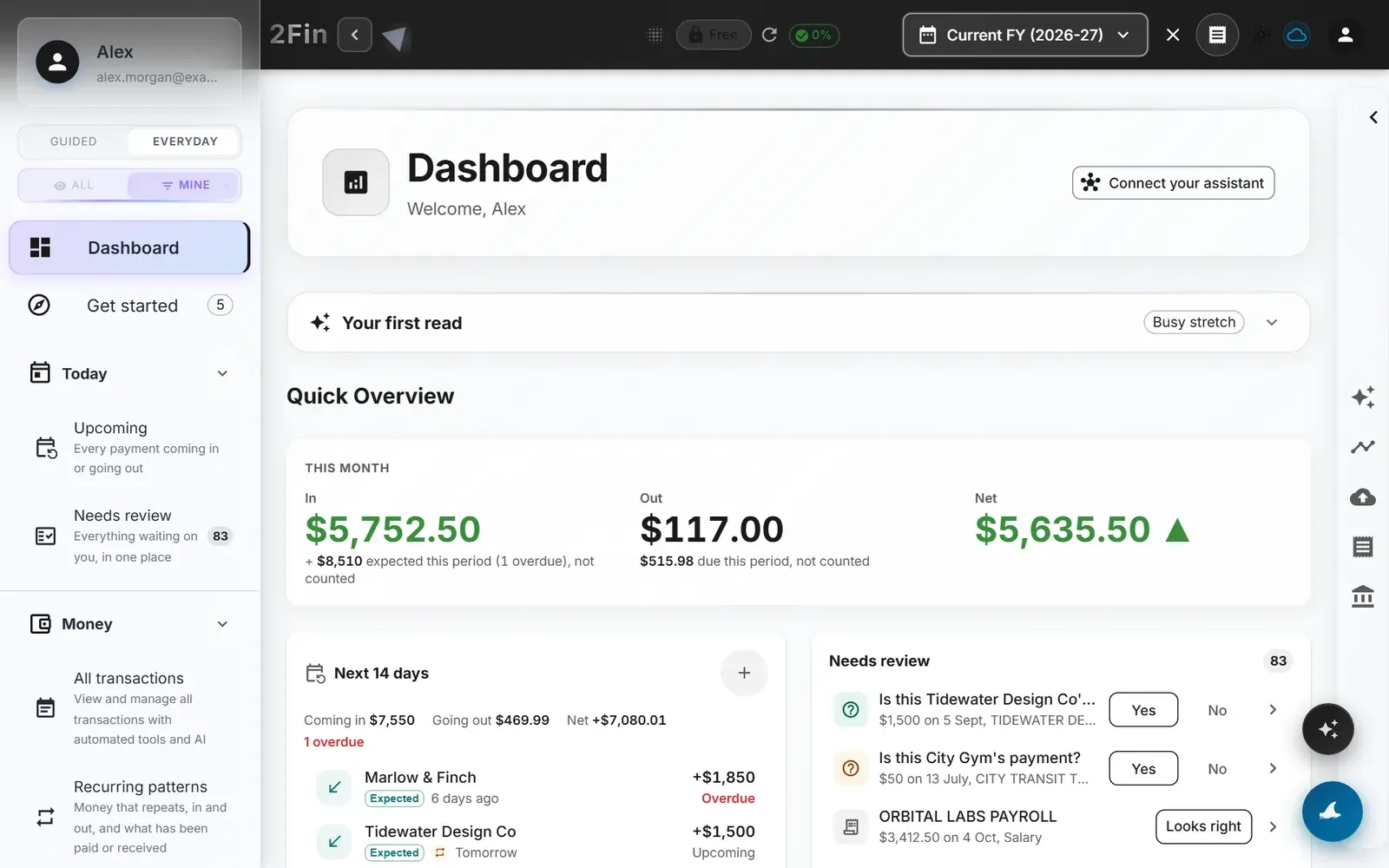
- Bank import, categorization, and auto-matching run in the same flow, so reconciled data is already tax-ready when you need it.
- Integrations with Xero, Google Sheets and other tools mean your reconciled transactions land where you already report.
Start free with 2Fin: connect an account, let Fin match the routine lines, and see how short your exceptions list gets. Paid plans add fuller automation; compare them on the pricing page.
FAQ
What software can I use to automate bank reconciliation?
Reconciliation automation is available through dedicated accounting platforms, standalone reconciliation tools, and finance management software that bundles matching with bookkeeping. The right choice depends on whether you need standalone reconciliation or a tool that also handles categorization and tax prep, like 2Fin.
How can I automate account reconciliation?
Automating account reconciliation starts with connecting bank feeds through APIs or file imports, then building matching rules that pair bank lines to ledger entries automatically. Exceptions that fail automated matching route to a queue for manual review, which keeps the process accurate without requiring a person to check every line.
Can bank reconciliation be fully automated?
Not entirely, and it should not be. Rules can clear most routine lines on their own, and machine-learning matching can rank likely matches using pattern recognition when exact and rule-based matching fail, speeding up the process for ambiguous transactions. It still routes genuinely complex exceptions, like duplicate payments or misclassified entries, to a human reviewer rather than resolving them independently.
What is the best software for bank reconciliation?
The best choice depends on your transaction volume, number of bank accounts, and whether you need reconciliation alone or as part of a broader bookkeeping workflow. Platforms that combine bank import, categorization, and matching in one flow, such as 2Fin, suit teams who want reconciliation built into their regular bookkeeping rather than run as a separate step.
How much does bank reconciliation automation cost to set up?
Costs vary by platform and by how many accounts and transaction types need custom matching rules, with most of the setup cost coming from internal time spent building and testing rules during a pilot. Software pricing itself ranges from free tiers to paid subscriptions, such as 2Fin’s plans.
Recommended
Stay updated with 2Fin
Get the latest insights on intelligent financial management delivered to your inbox.