Every receipt sorted. Every deduction surfaced.
Snap a receipt, forward it by email, or connect your bank feed — Fin reads it, files it against the right transaction, and flags what looks claimable. By the time tax season arrives, your year is a review rather than a reconstruction.
The layer that understands your money
AI2Fin (2Fin) sees your numbers and connected data and arranges them. You keep invoicing in your own tool; when the payment lands in your bank feed, Fin sees it arrive and records it as income.
One ledger that understands your money
Each transaction, and each line of a split payment, is tagged to your job, your business or your private life — and to a property where it belongs, with shares dated from the day they apply. Lenses, your own rules and Fin’s automatic categorisation do the arranging; receipts are matched to their transactions.
How each line is treated →Your refund, live
An estimate of your refund or what you owe for the year, after PAYG withheld, with the Medicare levy, the low income tax offset and HELP — from your salary or your business income.
Try the income tax calculator →An Accountant Pack
A year-end workbook, a PDF summary and the receipts, ready to hand to your accountant.
For accountants →Home decisions, weighed
Working from home or running a business there: deduct occupancy costs now, or keep the full main residence exemption? Weighed with your own figures.
Try the free tool →Your assistant can read it
Connect Claude, ChatGPT or another assistant through 2Fin’s MCP server and ask about your records. Read-only by default; changes need write access you grant.
Connect an assistant →Invoicing?
Keep using your own tool. Fin doesn’t send invoices — when the client pays, the payment lands in your bank feed and is categorised as income.
Intelligent Automation
Smart Categorization
Learns from youMachine learning categorises your transactions from day one — merchant, pattern and your own rules — and gets more accurate as it learns from what you correct.
Auto Type Detection
Hands-freeFin automatically identifies whether transactions are business expenses, personal spending, tax-deductible costs, or recurring payments — no manual tagging needed.
Pattern Analysis
Proactive insightsDetects recurring spending patterns, seasonal trends, and unusual transactions across your financial data. Surfaces insights you'd miss with manual review.
Intelligent Assistant
Natural languageAsk questions about your finances in plain language. Get instant answers about spending, budgets, tax deductions, and financial trends through the assistant chat interface.
Tax & Compliance
Tax Deduction Finder
Every transaction checkedFin scans every transaction to identify potential tax deductions you might miss. Supports GST/VAT handling for global compliance.
Tax Export
Audit-readyGenerate tax-ready reports with categorized deductions, GST summaries, and compliance documentation. Export in formats your accountant or tax software expects.
Custom Rules
Full controlDefine your own categorization rules for edge cases. Set merchant-specific categories, amount-based rules, and keyword triggers that work alongside the automatic categorisation.
Tax Treatment & Activity Statement
Every figure traceableA tax treatment on every category — GST on Income, GST-Free, Input Taxed, GST on Capital, BAS Excluded — so each transaction lands on the right label. The statement is a print-ready document with a provenance badge on every figure, Adjust-with-a-reason and an audit trail. Australia, NZ, UK, Canada, Singapore and India.
Asset Register & Depreciation Schedule
Two clocks, one bank lineAdd a depreciating asset straight from a bank transaction, choose prime cost or diminishing value, set the private-use share, and print a schedule with effective lives from the ATO determination. Australia-first.
Properties — Rented, Business & Private
Split by useAdd a property once with its rented, business and private shares and your ownership share, tie its strata, rates, insurance and loan interest bills to it, and every cost splits the way the property is used. Properties is a built-in lens on every plan, with each property as an entry; each property's Tax tab follows your country's form, with the write-offs and the schedule download on ELITE+.
Receipts & Documents
Photo Receipt Capture
Snap and doneSnap a receipt with your phone and Fin reads the merchant, amount, date and line items straight off the image. The expense lands categorised, with the picture kept alongside it.
Email Receipt Forwarding
Forward and forgetForward receipt emails to your own AI2Fin address and they file themselves — extracted, categorised, and matched against the transaction on your bank feed.
Encrypted Document Storage
AES-256 encryptedReceipts, invoices, contracts and statements sit in one AES-256 encrypted store, attached to the transactions they belong to and exportable whenever you want them.
Document Analysis
Plain-language answersAsk Fin about anything you have uploaded — the payment terms buried in a contract, or what an invoice actually covers — and get an answer in plain language.
Data Input & Management
Getting Your Records In
CSV, Excel or PDF — or a sheet you ownDrop a CSV, an Excel workbook or a PDF statement from virtually any bank worldwide. Fin reads every sheet, matches the columns for you and shows what each row becomes before anything lands — dates, money in, money out, your own headings as categories. A layout Fin has seen once is remembered, and a budget sheet becomes a budget. Or point Fin at a spreadsheet you already keep and it stays in step as you add rows — read with a key you hold, straight from your own storage.
Connections In
Stays in stepConnect your bank through a bank-data service that covers your country, and new transactions arrive and get categorised on their own. The connection is yours — you set it up, you can revoke it, and Fin only reads what it returns. Or skip it entirely: a spreadsheet you keep or a CSV export works just as well.
Smart Filters
Instant searchPowerful filtering across all your financial data — by date, amount, category, type, merchant, and custom tags. Find any transaction instantly.
Bulk Management & Analyses
Built for real volumeImport years of history without the page timing out — large imports process automatically behind the scenes, and statement uploads into buckets are on every plan. Having Fin categorise big batches in one action is Premium and up.
How Fin Decides
Shown, not describedTen real bank rows walked through the decision chain — the merchant Fin read, the category and how sure it was, whether it is deductible, the business-use share, and the reasoning in words. Including the rows where it was unsure.
Reports & Insights
Budget Allocations
Decide before you spendSet a spending limit on each category before the period starts, then watch actual spend fill it in. Weekly through yearly cycles, savings goals, and a meter for income you have not assigned yet. Free on every plan.
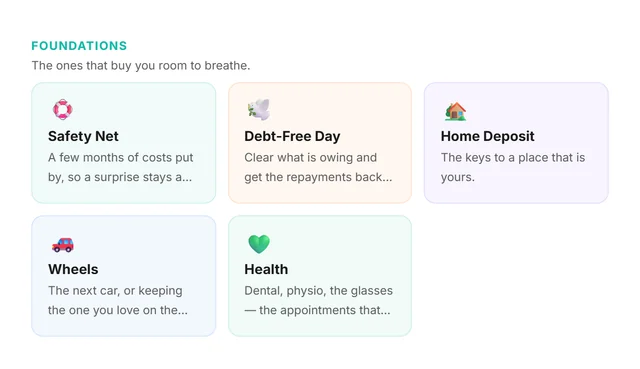
Savings Goals
Room to breatheStart from a goal worth having. Foundations buy you room to breathe — a safety net, a debt-free day, a home deposit. Adventures are somewhere new, festival season or a small day out. Passions are the instrument or the course you keep meaning to start. Set your own target and date, or start blank, and top goals up from leftover income whenever you choose. Free on every plan.
Insight+
Visual dashboardsVisual dashboards showing spending trends, category breakdowns, cash flow forecasts, and budget performance. Understand your finances at a glance.
Bill & Subscription Tracking
Never miss a billAutomatically detects recurring bills and subscriptions from your transactions, with the next expected date on each, so the ones worth cancelling are a list you read rather than a hunt through statements.
Travel Expense Management
Multi-currencySpecialized handling for travel expenses including per-diem tracking, multi-currency support, receipt capture, and compliance-ready expense reports.
Cost Tracking & Job Costing
Profit by projectGroup spending by project, client or cost centre and see cost of goods sold against your sales, so you know which work actually pays. Views are on the Elite and Auto plans.
Developer & Integration
REST API
Automation-readyConnect your tools to AI2Fin. Push transactions and expenses in from other systems, manage automations, and get real-time webhook notifications for the data you've entered.
MCP Server
Assistant-readyModel Context Protocol server lets assistants like Claude and Cursor work with the financial data you've added to Fin — manual entries, imports, and API records. The future of connected finance.
Zapier, Make & n8n
Runs on your cadenceFin sends signed webhooks to Zapier, Make, n8n or any HTTPS endpoint the moment new activity is categorised. Pair that with the export endpoint and those tools can run your handover on whatever cadence suits — monthly, quarterly, or the week before a BAS is due.
Outbound Destinations
Lands in your accountPush your categorised transactions into your own Google Sheets, Excel, Notion or Airtable account — daily or on demand, with the category, tax treatment and receipt reference already attached. What goes across is what you entered, imported or captured from a receipt.
Telegram Mini App
Coming soonLog expenses and check financial insights directly from Telegram — on-the-go money management, arriving soon.
Ready to automate your finances?
Join thousands of individuals and businesses using AI2Fin to save time, maximize tax deductions, and gain financial clarity.
Get 2Fin freeFeatures, answered
Common questions about what AI2Fin does
- How does AI2Fin's smart categorisation work?
- Fin uses machine learning to analyse transaction patterns, merchant data, and your spending behaviour. It starts from merchant and pattern data and gets more accurate as it learns from the corrections you make.
- Can AI2Fin find tax deductions automatically?
- Yes. Fin scans every transaction for potential tax deductions based on your country's tax rules, business type, and category settings. Deductible expenses are flagged and exported in tax-ready files. Always confirm eligibility with your accountant or tax authority.
- Can I capture receipts with AI2Fin?
- Yes. Snap a receipt with your phone camera and Fin extracts the merchant, amount, date and line items, or forward receipt emails to your dedicated AI2Fin address and they file themselves. Documents are stored with AES-256 encryption and attached to the matching transaction.
- How do my transactions get into Fin?
- Drop a CSV, an Excel workbook or a PDF statement from virtually any bank worldwide. Fin reads every sheet in the file, matches the columns for you, and shows you what each row becomes — the date, the amount, money in or out — before anything is saved, so a wrong day-month order or a flipped sign is caught in the preview, not after. Rows Fin cannot read are listed with the reason rather than dropped quietly. Multi-currency is handled along the way. Or connect a spreadsheet you already keep and it stays in step as rows are added — read with a key you hold, straight from your own storage, with no copy kept. Nothing needs your banking credentials, and nothing can move money.
- Can Fin read a spreadsheet I keep by hand, not a bank export?
- Yes. A home or office ledger rarely looks like a bank file — dates typed as 28.03.26, a Deposit column beside an Amount Spent column, a Head of account column with your own codes, a running balance, notes in two places. Fin reads all of that: it works out the day-month order from the values, takes each money column with the direction its heading implies, turns your headings into categories you can rename, and keeps the extra notes with the row. If a sheet is a budget — categories with a monthly figure — Fin offers to create a budget from it instead. The second time you bring in the same layout, Fin remembers it and skips the questions.
- Who is AI2Fin for?
- PAYG employees, sole traders and people who are both — plus freelancers, students, property investors and small businesses in Australia. The free plan gives you your dashboard, categories, statement uploads, live feeds from your own sheet or bank-feed provider account, and every transaction you record, sorted by your own rules and recurring patterns. Premium adds automatic categorisation by Fin, receipt capture and the tax tools.