Ask your money a question, out loud, and hear the answer.

Ask what you spent, what is due, or how a category is tracking, and hear the answer with the figures written beside it. On the desktop, Private voice turns your speech into text on your own computer. Fin voice is on Premium, ELITE+ and AUTO+, with a short taster on Free and Basic.

The answer is in your data. Getting to it takes six taps.

Most money questions are simple: how much on groceries this month, when is the car insurance due, am I over on eating out. Finding the answer means opening the app, finding the right screen, setting the right filter and reading a chart. Often the moment has passed by then.

Say it, and Fin answers

Voice lives in the Fin chat window, so every spoken answer is also written down with its figures, ready to read back.

  1. Ask in plain words

    “How much did I spend on fuel last month?” Fin answers with the figure and how it compares with the month before.

  2. In your language

    Spoken answers in English, French, Italian, German, Spanish, Portuguese and Hindi. In Japanese, Vietnamese and Chinese, the full answer appears on screen in your language.

  3. Private on the desktop

    In the desktop app, Private voice turns speech into text on your computer and replies in your computer’s own voices, after a one-time download.

  4. You stay in charge

    Ask Fin to change something and it says back what it will do, then waits for your yes. The conversation stays in the chat window to read back.
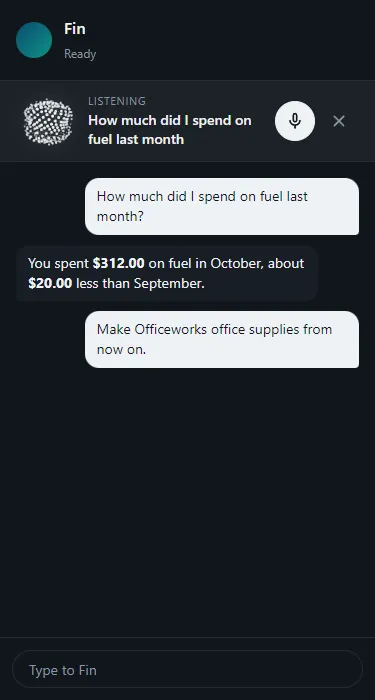
Fin voice on a phone. Example figures from test books.

What a question sounds like

Tom taps the voice button and asks, “How much did I spend on fuel last month?” Fin answers: $312 in October, about $20 less than September. The same answer is written in the chat, with the figure in bold.

He follows up: “Make Officeworks office supplies from now on.” Fin repeats back what it will change and waits for his yes before making the rule.

Who it is for

  • Tom · tradie between jobs

    Hands full and in the ute. He asks what is left in his fuel budget and hears it, without stopping to tap through screens.

  • Lucía · nurse in Madrid

    Asks in Spanish and hears the answer in Spanish, with the figures on screen.

  • Arjun · privacy-minded developer

    Uses Private voice in the desktop app, so his words become text on his own machine.

Fin voice, answered

Questions about Fin voice

Is there a budgeting app I can talk to?
2Fin has Fin voice: ask about your spending, bills and categories out loud and hear the answer, with the same answer written in the chat. You can also type to Fin, or ask through Claude or ChatGPT with 2Fin’s MCP server.
Which plans include Fin voice?
Premium, ELITE+ and AUTO+, each with a monthly allowance of voice minutes. Free and Basic get a short one-time taster once your email is verified.
Which languages does Fin speak?
English, French, Italian, German, Spanish, Portuguese and Hindi. In Japanese, Vietnamese and Chinese, Fin shows the full answer on screen in your language.
Can I keep my voice on my own computer?
In the desktop app, Private voice turns speech into text on your computer and replies in your computer’s own voices. Fin then reads your words as text, the same as a typed question.
Can Fin change my books from a voice command?
Yes, with your say-so. Fin repeats back what it will change, such as making a rule or setting a category, and waits for your yes before it does anything.

Ask your money anything. Out loud.

Start free with a taster of Fin voice, and keep talking on Premium and up.