Your shares, ETFs and crypto, with the growth told apart from what you put in.

Add an investment account, record your trades by hand or bring them in from a broker or exchange file, and see the value over time beside the money you put in. On ELITE+, dividends, franking credits and capital gains flow into your Australian tax estimate. Holdings, trades, file import and your net worth are on Premium, ELITE+ and AUTO+; each holding’s parcels, the choice of a sale’s share parcels, capital gains, and dividends with franking credits in your Australian tax estimate are on ELITE+ and AUTO+. Fin shows your own holdings and the rules as they are. It isn’t financial product advice and doesn’t recommend buying or selling anything. General information, not tax advice.

A balance going up does not say why

A share account that grew by $7,000 this year sounds like a great year, until you remember you added $6,000 of it yourself. Broker apps show the balance; few tell you how much came from prices and how much from you, or keep each parcel, dividend and franking credit ready for tax time.

Your own records, laid out like a broker screen

Everything on the screen comes from the trades you record and the prices you set, and it says so.

  1. Accounts and trades

    Add a broker account, a crypto exchange, a wallet or a managed fund. Record what you bought and sold, dividends paid or reinvested, distributions, and splits or consolidations.

  2. Import a file, checked first

    Bring in a broker or exchange file. Fin shows how it read each column and lets you change it, checks every row before anything is saved, and leaves out trades you have already imported.

  3. From prices, and from you

    The headline splits the change over the range into what prices did and what you added. A dashed line shows the money you put in under the value line, from one week to everything since the first trade.

  4. Dividends, franking and capital gains (ELITE+)

    The Income tab shows each year’s dividends with their franking credits and the grossed-up figure. The Tax tab lists each sale’s gain, lets you choose which share parcels you sold, and works out the net capital gain in the ATO’s order, with losses carried in from earlier years. In Australia, both flow into your tax estimate.
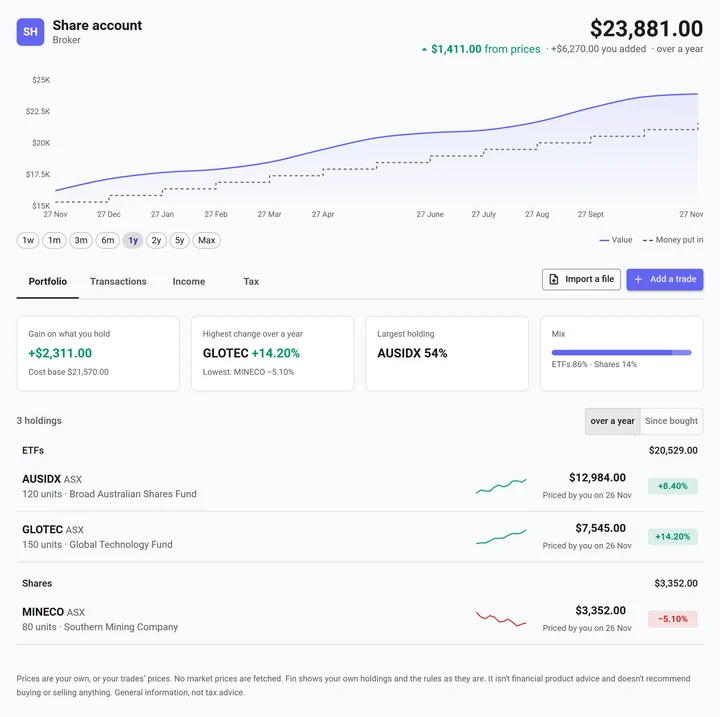
An investment account over a year, with prices you set.

What the account screen shows

Facts about your own holdings, in the order you would look for them.

Holdings by class

Shares, ETFs, funds, bonds, crypto and cash grouped with their totals, each holding with its units, a sparkline and its change over the range or since you bought it.

One holding, opened

The price over time with your buys and sales marked, the dividends it paid and its share of the account; on ELITE+, each parcel with its cost base and the date it reaches 12 months.

Prices that say where they came from

Set your own price for any holding, or use the price from your last trade. Each one is labelled, so a figure is never mistaken for a market feed.

In your net worth

The investment accounts you keep in 2Fin count in the net worth card’s Investments group, with the same eye and the same Discreet mode as your bank accounts.

Ask Fin

Ask Fin in chat what you hold and how an account has moved, and on ELITE+ what a year’s dividends and gains came to, with the answer from your own records.

Ready for your accountant (ELITE+)

The Accountant Pack carries an Investments sheet: each sale with its parcels and capital gains lines, each dividend with its ex-dividend day, and your record of what you held on 30 June 2027.

Facts, never tips

No ratings, no rankings and no nudges to buy or sell. The highest change always sits beside the lowest.

Twelve months of saving, told apart

Mei’s share account reads $23,881. Over the year she put in $6,270 from her pay, and the headline says the rest, $1,411, came from prices.

She records this week’s prices from her broker’s app and opens the Income tab: two franked dividends, $78.85 of franking credits, and well under the $5,000 of credits where the 45-day holding rule starts to matter.

Who it is for

  • Mei · nurse in Brisbane

    Adds to two ETFs every month. The account screen shows her how much of the year’s growth was her own savings and how much came from prices.

  • Daniel · software tester in Adelaide

    Imports his exchange file once a quarter. Fin skips the trades it already has, so he never doubles a purchase.

  • Priya · sold a parcel of shares this year

    On ELITE+, picks the parcel she sold, sees the gain land in her tax estimate with her franked dividends, and hands the figures to her accountant.

Where the tax rules come from

Dividends, franking and capital gains follow the Australian Taxation Office’s own pages. General information, not tax advice.

Investments, answered

Questions about investments in 2Fin

Can 2Fin track my shares and ETFs?
Yes, on Premium and up. Add an investment account, record your trades or import a broker or exchange file, and 2Fin keeps each holding with its units and cost base (its parcels on ELITE+), shows the account’s value over time beside the money you put in, and counts it in your net worth card.
Where do the prices come from?
From you. Set a price for any holding, or 2Fin uses the price of your last trade, and each figure says which. Your broker’s own app keeps the live market price; enter it in 2Fin whenever you want the value brought up to date.
Does 2Fin put franking credits and capital gains into my tax estimate?
In Australia, on ELITE+ and AUTO+, yes. Franked dividends and their credits, reinvested dividends and the year’s net capital gain go into your tax estimate, with the credits given back as the franking offset and any left over refunded. Net capital losses carried in from earlier years come off before the discount: your own figure from the Tax tab, or last year’s carry-forward from your records. The year-end return shows the figures on the dividend and capital gains lines. Sales from 1 July 2027, units with no purchase on record, and ETF and fund distributions are not counted yet, and the estimate says so. General information, not tax advice; your accountant or the ATO has the final word.
Does 2Fin check the 45-day rule on franking credits?
On ELITE+, yes, as a check you can see. Enter a dividend’s ex-dividend day when you record it, and once your franking credits for the year reach $5,000, each franked dividend shows whether the shares were held long enough around that day, or whether the period is still open. The tax estimate still counts every credit and its note says what the check found, so you and your accountant decide. General information, not tax advice.
What is the 1 July 2027 record?
On ELITE+, the Tax tab keeps a record of each parcel you hold at the end of 30 June 2027, with the price you enter for 30 June and for 1 July 2027. It uses only your own prices and works nothing out from them; until the day has passed it says it is the record so far. It is there for your accountant when the capital gains changes from 1 July 2027 apply. General information, not tax advice.
Does 2Fin give investment tips?
2Fin keeps to facts about your own holdings: what you hold, what it cost and how it has changed, with no ratings, rankings or nudges. Fin shows your own holdings and the rules as they are. It isn’t financial product advice and doesn’t recommend buying or selling anything. General information, not tax advice.
Can I import trades from my broker?
Yes, from a CSV or Excel file your broker or exchange lets you download. Fin shows how it read each column, lets you change any of them, checks every row before anything is saved, and leaves out trades it has already imported.

See what your savings did, and what the market did.

Your savings, your holdings and your tax, side by side in one app.