


















AI Bookkeeping: What It Does, Where It Needs You, How to Start

AI bookkeeping: automation with human review. Image: 2Fin (ai2fin.com).
AI bookkeeping is software that reads your bank and card transactions, sorts them into categories, matches receipts, flags oddities and prepares reports, so you stop typing numbers into a ledger by hand. It works best as a fast first draft that you review, not as an autopilot. This guide explains what it does well, where a person still matters, what the different models cost, and how to roll it out without creating a mess your accountant has to untangle.
Last reviewed October 2026. General information, not tax or financial advice.
TL;DR
- AI bookkeeping automates the repetitive part: categorizing transactions, matching receipts, reconciling and drafting reports. Judgment calls stay with you or your accountant.
- Keep a person in the loop. Let the software suggest and flag, then approve before anything is final.
- Tax authorities still expect records that trace back to source documents, however automated your books are.
- The phrase covers three different models with very different price tags. Pick the one that matches the problem you actually have.
- General chatbots can help with one-off tasks but are not a bookkeeping system.
What does AI bookkeeping actually mean?
The phrase is stretched across very different products. One 2026 comparison of bookkeeping tools sorts the field into three: self-serve software that automates your books, a human team working behind a chat box, and established accounting platforms adding intelligent features on top. That split matters because it decides who does the work:
| Model | Who does the work | Best for |
|---|---|---|
| Self-serve automation | You review what the software drafts | Owners and sole traders who want control and low cost |
| Done-for-you with intelligent tools | A human team uses the software behind the scenes | Owners who never want to look at the books |
| Intelligent features added to a legacy ledger | You, inside a familiar system | Businesses already committed to one platform |
Under the hood, most tools do the same handful of jobs: import transactions through a bank connection or file upload, categorize them from the merchant name and past behavior, read receipts and invoices, reconcile against statements, and surface anomalies. A rule of thumb: the more of those jobs you want done without looking, the more a person has to be involved somewhere, and the more it costs.
What does AI bookkeeping do well?
Categorizing transactions
This is the most reliable win. A card charge from a hardware store, a software subscription, a fuel purchase: the pattern repeats every month, and software that learns from your past decisions gets it right most of the time. The time saved is in the volume, not the difficulty. Good tools let you lock in preferences with rules, for example "always treat this merchant as office supplies": that is what custom rules do alongside smart categorization in 2Fin. Bank descriptors can be cryptic, which is why there is a guide to decoding bank transaction descriptors.
Pulling data out of documents
Receipts, invoices and statements are unstructured. Intelligent extraction reads the date, vendor, amount and tax from them. The AICPA describes a small firm that found its best use of automation by looking for manual, repetitive logjams, with invoice data extraction as a typical example, rather than trying to automate everything at once. That advice applies to a one-person business too.
Reconciling and flagging
Matching bank lines to books, spotting duplicates and noticing that a recurring bill suddenly doubled are tasks software does tirelessly. The value is the flag, not the fix: you decide what the anomaly means.
Reporting while the year is still open
When categorization happens continuously, a profit and loss view is available any day, not after a frantic quarter-end. That helps you price jobs, set aside tax and see a cash squeeze early. A rolling 90-day cash flow forecast only works when the records behind it are current.
Where does AI bookkeeping need a person?
Silent errors at scale
A wrong guess repeated across hundreds of transactions is worse than a typo. Practitioners interviewed by the IFAC describe a "human-in-the-loop" approach, where the software suggests categorizations or flags anomalies and a qualified person approves them, instead of letting the system post to the ledger on its own. Copy that habit.
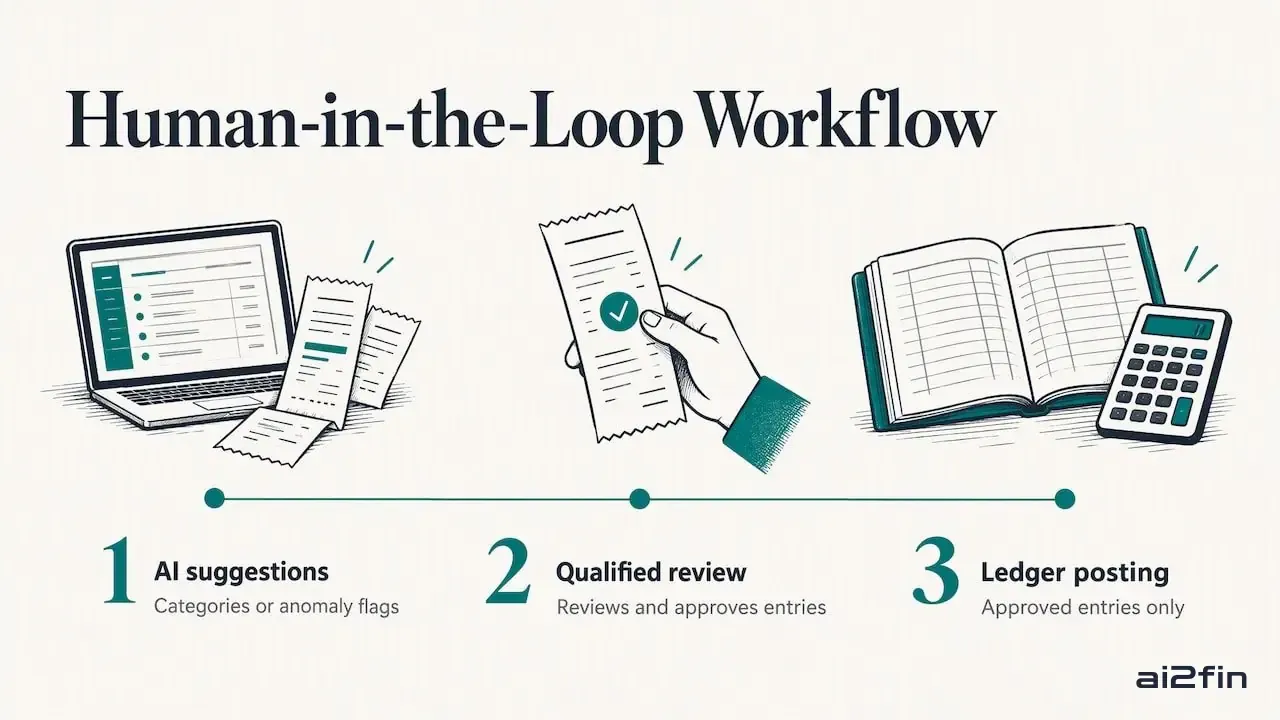
AI bookkeeping flags reviewed by a person. Image: 2Fin (ai2fin.com).
Context the software cannot see
A $2,000 laptop might be a deductible expense, a depreciating asset, or partly personal. A payment from a relative might be a loan, a gift or income. The software sees a number and a merchant. You know the story, so anything with tax consequences deserves a human decision. The tax treatment of each line is the part worth reviewing, and apportionment covers mixed personal and business use. To see what a purchase like that does to your deductions over time:
Work out the depreciation on an asset
Treating a chatbot as a bookkeeper
General-purpose assistants are useful for narrow jobs, such as turning a messy statement into a CSV or explaining a term. They are not accounting systems. OpenAI says its personal finance features in ChatGPT do not replace professional financial advice and can only visualize and analyze the data you provide. That is a budgeting aid for individuals, not a ledger with an audit trail. So, to the question many readers ask: yes, ChatGPT can help with pieces of bookkeeping, but it cannot be your books.
Privacy
If you paste financial records into a public chat tool, you are responsible for what you share. AICPA guidance advises scrubbing names, birthdays and account numbers before using public chat interfaces, or turning off data retention in your account. A dedicated bookkeeping product with clear data handling is a safer home for transaction data than a chat window.
Does AI bookkeeping replace the bookkeeper?
Not the good ones. It replaces the data entry and shifts the person toward review, cleanup and advice. The IFAC conversation notes that adoption goes better when leaders show teams how automation moves professionals toward higher-value advisory work.
For sole traders and freelancers the question is different: the software is the bookkeeper you could not afford, with an accountant stepping in at tax time. The accountant workspace keeps the handoff between you and your professional clean, and automate your bookkeeping handover shows what a good handover contains.
What does AI bookkeeping cost?
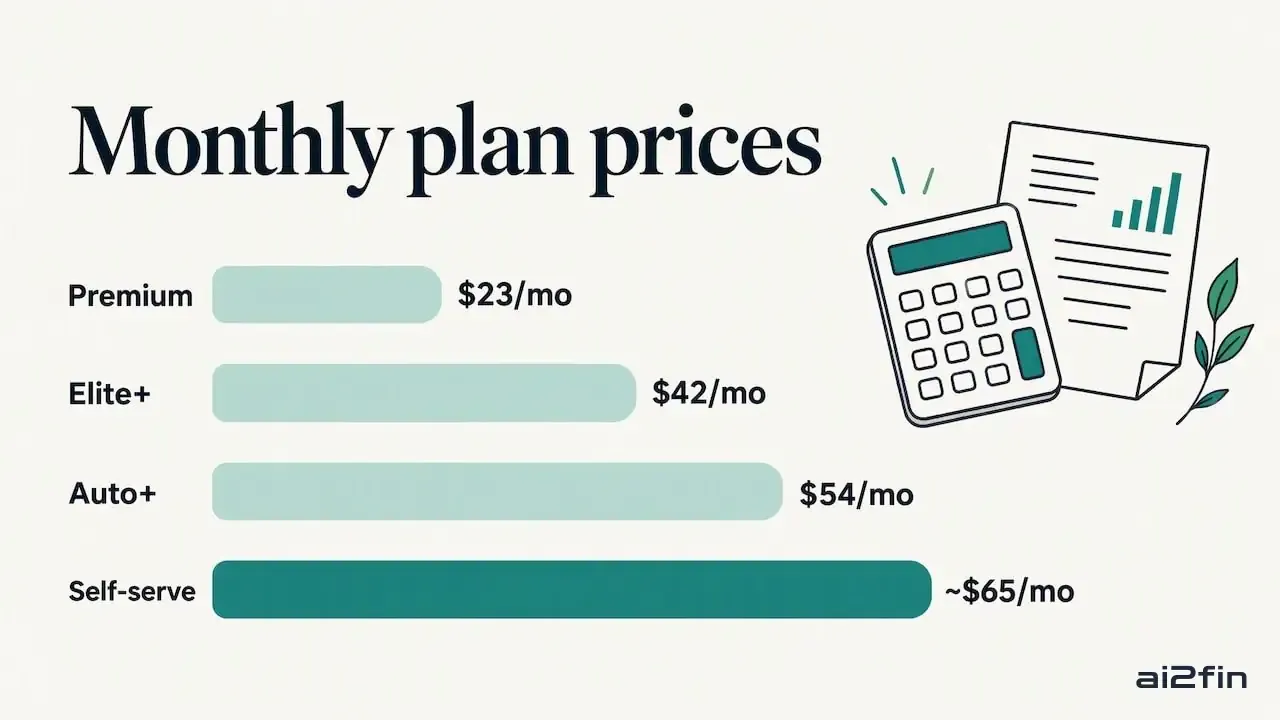
What AI bookkeeping costs: the three models. Image: 2Fin (ai2fin.com).
Price follows the model, because people cost more than software. In one 2026 roundup of bookkeeping tools, published entry prices ran from free-to-start and about ten dollars a month for self-serve products up to roughly four to five hundred dollars a month for done-for-you services with human oversight. Treat any figure as a snapshot: prices change, and what a tier includes matters more than the headline number. Some platforms, including 2Fin, have a free tier for basic use. The plans page lists what each tier includes.
How do you start with AI bookkeeping?
- Name your biggest time sink. Is it sorting transactions, chasing receipts, or preparing for tax? Start with one. The AICPA advice quoted above is to fix the problem you have, not adopt abstract technology.
- Separate your money streams. Personal, business and rental property spending tangled in one account is the main reason software gets confused. Decide the splits before you import.
- Import a few months, not years. Review the results line by line. Note which categories are wrong, then write rules to correct them.
- Approve, don't auto-post. Keep a review step until the error rate on your own data is low and stable.
- Attach source documents. Upload receipts so every entry points back to evidence.
- Book a checkpoint with your accountant. After the first month or quarter, ask them to look at categories, depreciation and anything with a tax treatment.
- Export, don't hoard. Make sure you can get accountant-ready exports and back up your records.
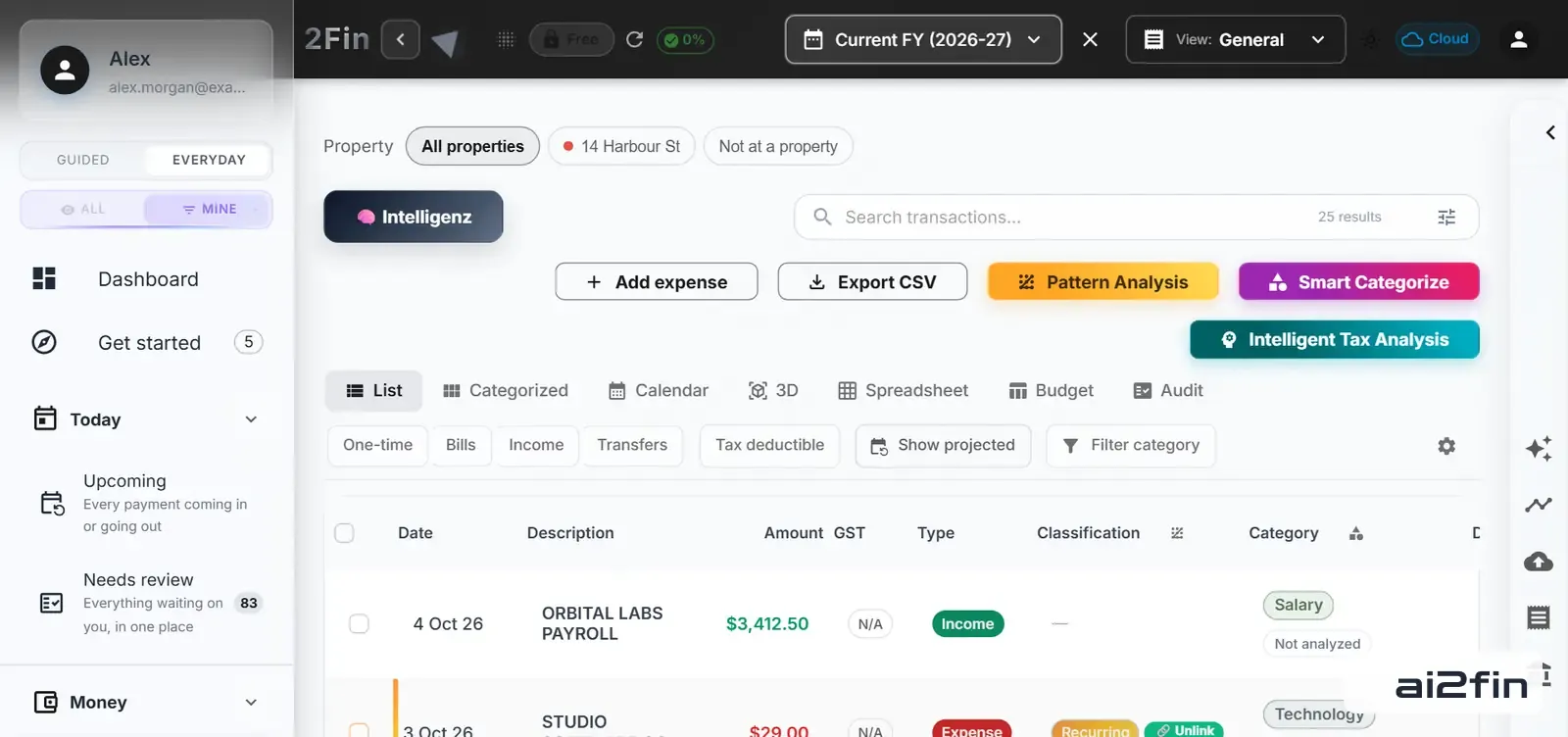
2Fin All Transactions view. Image: 2Fin (ai2fin.com).
Step 3 and step 4 look like this in 2Fin: every imported line with its type, GST and category beside it, and anything unsure waiting in one list. Open your own transactions.
Records, audits and the IRS
Automation does not shorten your legal duty to keep records. The IRS's automated records procedure sets out requirements for taxpayers whose records are kept in an automatic data processing system, including that machine-sensible records reconcile with your books and give an audit trail back to source documents. If you run a team, document how your routines actually work, exceptions included, so new hires and tools have something solid to follow; this guide to documenting procedures with automated tools covers capturing procedures in plain language.
On retention, the IRS says that in general you should keep records for three years from the date you filed, though some records, such as property you sell, need to be kept longer. Your situation may differ, so ask a CPA or enrolled agent how long to hold your particular records. How to organise receipts for tax covers the practical side.
How do you choose a tool?
Whatever you evaluate, run it against these questions:
- Accuracy on your data. Test with your own transactions, not a demo.
- Explainability. Can you see why something was categorized the way it was, and correct it permanently?
- Tax awareness. Does it handle deductions, asset depreciation and personal versus business splits?
- Integrations. Can it send data to your spreadsheets or accounting software and accept receipts?
- Privacy. Where does your data live, and can you control it?
- Exit. Can you export everything in a usable form?
- Price against value. A tool that saves five hours a month behaves very differently from one that costs hundreds.
Already on an accounting platform? See how 2Fin sits alongside Xero or MYOB.
How 2Fin approaches it
The winning design is automation that learns from you and keeps you in charge. Most people who use 2Fin are not bookkeepers: they are employees tracking work deductions, sole traders, freelancers, small business owners and property investors. Their problem is not a lack of ledgers. It is disorganized finances and the worry of missing deductions at tax time.
Three beliefs shape it. Categorization should improve with every correction you make, so Fin gets closer to how you actually spend. The hard cases, such as depreciation, mixed personal and business use, rental property costs and cost of goods sold, belong in the same place as the everyday ones, not in a spreadsheet on the side. And your records should move easily: 2Fin connects with spreadsheets and accounting apps, takes receipt uploads, and produces exports your accountant can use. There are also privacy-first desktop options for people who prefer to keep data close.
Fin does the first 90 percent of the sorting, and you spend your attention on the decisions that matter.
If you run a business with staff or inventory, see how bookkeeping for small business works, or follow the path from bank import to tax-ready books. More on the same ground: how intelligent expense tracking works, automated bookkeeping for small businesses and bank reconciliation automation.
Frequently asked questions
What is AI bookkeeping?
AI bookkeeping is software that reads your bank and card transactions, sorts them into categories, matches receipts, flags oddities and prepares reports. It works best as a fast first draft that a person reviews and approves.
Can ChatGPT do my bookkeeping?
It can help with isolated tasks, like converting statement text into a spreadsheet or explaining a term. It cannot keep a ledger, reconcile accounts or give you an audit trail. OpenAI also says its personal finance features do not replace professional advice.
Is AI replacing bookkeeping?
It is replacing manual data entry, not the need for review and judgment. Practitioners describe a model where the software drafts and flags while a qualified person approves. The bookkeeper’s role moves toward checking, cleanup and advice.
Is there a free AI for accounting?
Some platforms offer free tiers for basic use, including 2Fin. Free plans typically limit features or volume, so test whether the free tier covers your real workload and check each provider’s current terms.
Is AI bookkeeping safe for sensitive data?
It depends on the tool and your settings. Avoid pasting names, account numbers or birthdays into public chat tools, and choose products that state clearly how they store and use your data. Ask your accountant if you handle client or payroll information.
How do I start with AI bookkeeping?
Name your biggest time sink, separate personal, business and rental money streams, import a few months and review line by line, approve rather than auto-post, attach receipts, and book a checkpoint with your accountant after the first month or quarter.
